


Troubleshooting - Web Part Errors
- There was an error notifying the Reminder Service of your
changes...
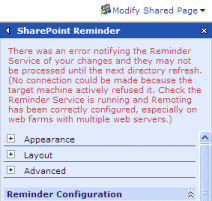
You receive the following error when you select Apply or OK on the Reminder Web Part configuration page.
There was an error notifying the Reminder Service of your changes and they may not be processed until the next directory refresh.
Please check the Reminder Service is running and Remoting has been correctly configured, especially on web farms with multiple web servers.
(No connection could be made because the target machine actively refused it)
This is because the SharePoint Reminder Service is not running or is not correctly configured if you are using a web farm.
Select Cancel (your changes will be saved anyway) and contact your Administrator.
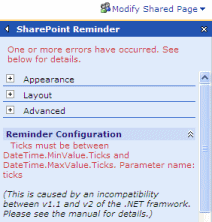
- System.ArgumentOutOfRangeException: Ticks must be between
DateTime.MinValue.Ticks and DateTime.MaxValue.Ticks
You receive the following error when you select Apply or OK on the Reminder Web Part configuration page.
"System.ArgumentOutOfRangeException: Ticks must be between DateTime.MinValue.Ticks and DateTime.MaxValue.Ticks"
There is an error in v1.1 of Microsoft's .NET Framework as described here - http://support.microsoft.com/?kbid=907262
It occurs when an application running under v2 of the .NET Framework attempts to send DateTime data to an application running under v1.1 via Serialization or Remoting.
If you install both .NET v1.1 and v2 side by side and configure an IIS virtual server hosting SharePoint Services to use v2 by following http://support.microsoft.com/?kbid=894903 the situation arises where the SharePoint Reminder runs under v2 but the SharePoint Service runs under v1.1.
There are 3 options for resolving this problem.
1) Stop the SharePoint Reminder Service and edit the file Pentalogic.SharePointReminder.Service.exe.config and enter the following lines in between </configSections> and <system.runtime.remoting>
<startup>
<supportedRuntime version="v2.0.50727" />
<supportedRuntime version="v1.1.4322" />
</startup>
This changes the default .NET binding behaviour for the Service to run it under v2 of the Framework if it is available (described in http://msdn2.microsoft.com/en-us/library/9w519wzk.aspx). If you are running Beta versions of the .NET v2 framework you may need to modify these values to the appropriate version numbers.
Warning - if you edit the config file incorrectly you will not be able to restart the SharePoint reminder service.
2) Apply the hotfix mentioned in http://support.microsoft.com/?kbid=907262
3) Change the configuration of the Virtual Server back to using v1.1 of the framework and reapply the changes in http://support.microsoft.com/?kbid=894903