


Incorrect Url in Email - SharePoint 2010, 2013, 2016 & 2019
Reminder takes the hyperlink from the Default Zone set in Alternate Access Mappings
|
Click Start > Administraive Tools > SharePoint 201x Central Admin then System Settings Under Farm Management select Configure alternate access mappings |
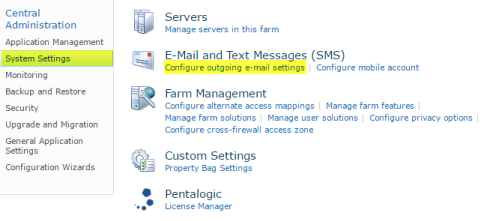 |
|
Select your website from the Alternate Access Mapping Collection drop down. If the URL you want to use in your emails is not the Default Zone then click Edit Public URLs and change the settings around. For example it is common for the computes NetBios name to be Default and the FQDN to be Intranet - these can simply be switched around. After making changes you will have to restart the Reminder service for these changes to be picked up. |
|
 |
|