

Common Scenarios - Documents are left Checked Out
If you have document libraries that require check out before editing then you've undoubtedly been faced with the situation where documents have been left checked out - blocking other users from editing the document.
Reminder allows you to send email alerts after a period of time to ensure checked out documents are not forgotten about.

Please note - this feature is new in version 1.7.16
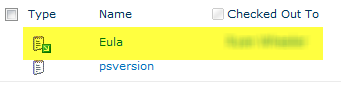
Imagine in the following document library the "Eula" document was first checked out 4 days ago - and we want to setup Reminder to send out email alerts after a document has been checked out for over 12 hours.
Just like in the other common scenarios we're going to start off by creating a new web part page to put our Reminder Web Parts on.
 |
Create a new page for the Reminder Web Parts |
 |
|
|
Add a Reminder web part to the page, and select "Modify
Shared Web Part" |
|
|
|
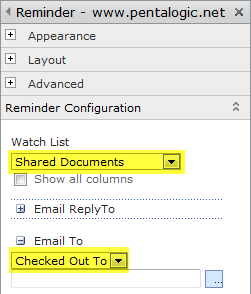
Set Watch List to your document library (in
this case "Shared Documents") Set Email To to be the "Checked Out To" column which contains the name of the person who has this document checked out |
 |
|
|
Setup a
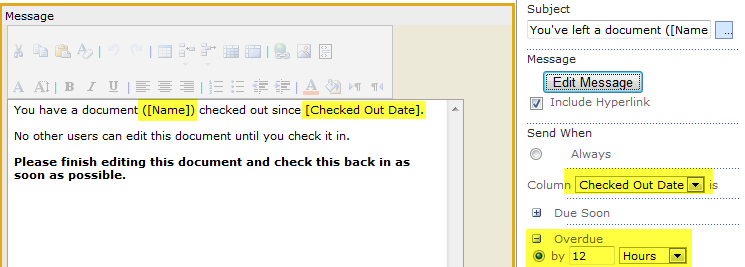
Subject and Message - remember you can include fields from the list like
[Name] and [Checked Out Date]. Set Send When to the column Checked Out Date is Overdue by 12 hours. (i.e. the document has been checked out for over 12 hours).
|
|
|
|
Further Ideas You could add an additional Reminder web part so that if the document is still checked out after, say 2 days, it sends a more forcefully worded email - perhaps CC'ing in a team leader and/or the creator of the document. |
|