


Frequently Asked Questions
-
Which versions of Microsoft SharePoint is World Time compatible
with?
SharePoint 2003 - Microsoft Windows SharePoint Services v2 and Microsoft SharePoint Portal Server 2003 (SPS 2003).
SharePoint 2007 - Microsoft Windows SharePoint Services v3 and Microsoft Office SharePoint Server 2007 (MOSS 2007).SharePoint 2010 - SharePoint 2010 including Foundation, Standard and Enterprise (SP 2010).
-
How do I use World Time?
World Time is delivered as a SharePoint Web Part. Once installed on a SharePoint server you add it to a WebPart page and then configure it to display the time from the time zone of your choice.
-
How can I get it to display more than one time zone?
Add a new Web Part onto your page for each time zone you wish to display.
-
Does World Time need any client software of ActiveX/Java
Applets
installed?
No - it works using standard HTML only, no client software is required.
- What languages does World Time support?
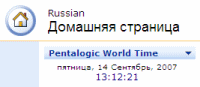
World Time supports all of the language packs for SharePoint that have been released by Microsoft, including those languages that use a non-Roman alphabet and require Unicode support. The clock will be displayed using the appropriate formatting and day/month names as per the sites regional settings. However the Tool Part configuration interface is only available in in English.
For example here is the World Time Web Part on a Russian language site with localized day and month names :-
- Does World Time take account of Daylight Savings times?
Yes - it takes the information from SharePoints TimeZone.xml file.
As the dates that Daylight savings come into effect can change (for example the US Energy Policy Act) you may have to update this file - http://support.microsoft.com/kb/888253/en-us
- Is it really free?
Yes absolutely, no catches!
- What is your policy for Support?
This is a free product so support is limited but we will do our best to help.
When emailing Technical Support please include as much detail as possible in your email. If it helps please include a screenshot using CTRL + PRINT SCREEN.
We are always keen to hear about how people are using our software and any comments or suggestions you may have.